DROM Connector
1. Create Form
Important
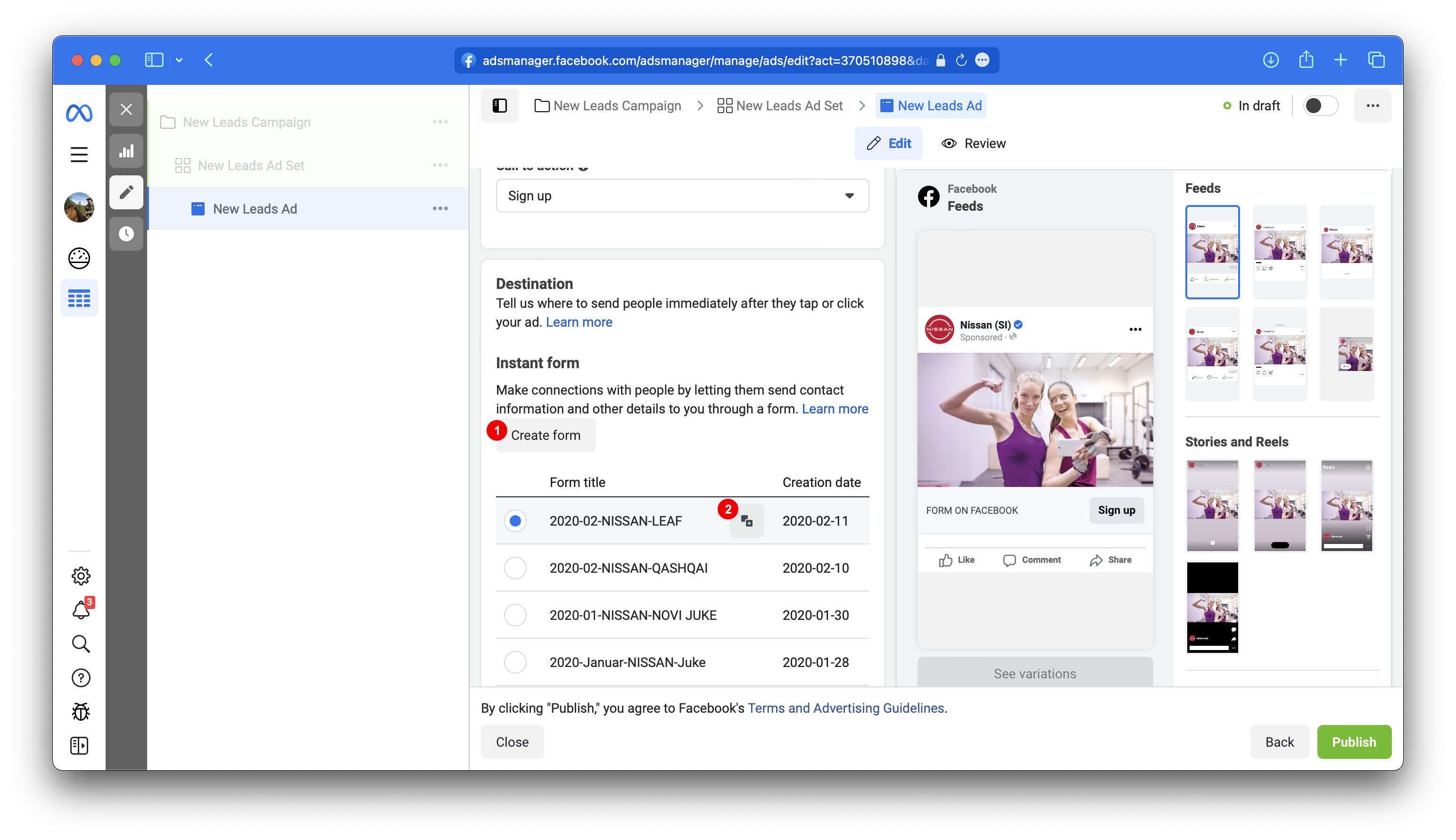
Under New Leads Ad section Instant Form create new form 1 or duplicate existing
one 2. Forms
cannot be edited and creation process has to be short otherwise you will get unknown error from Facebook. If
you need to make an edit to your form, duplicate it and make edit within a new form.
Prerequisites
- Vehicle model id as accepted by Vega. Example: Austral E-Tech
- Updated Vehicle model's Dealer list: Excel file with BIR, Title, Location. Consider using corresponding form on client's website.
2. Fill Content
2.1.
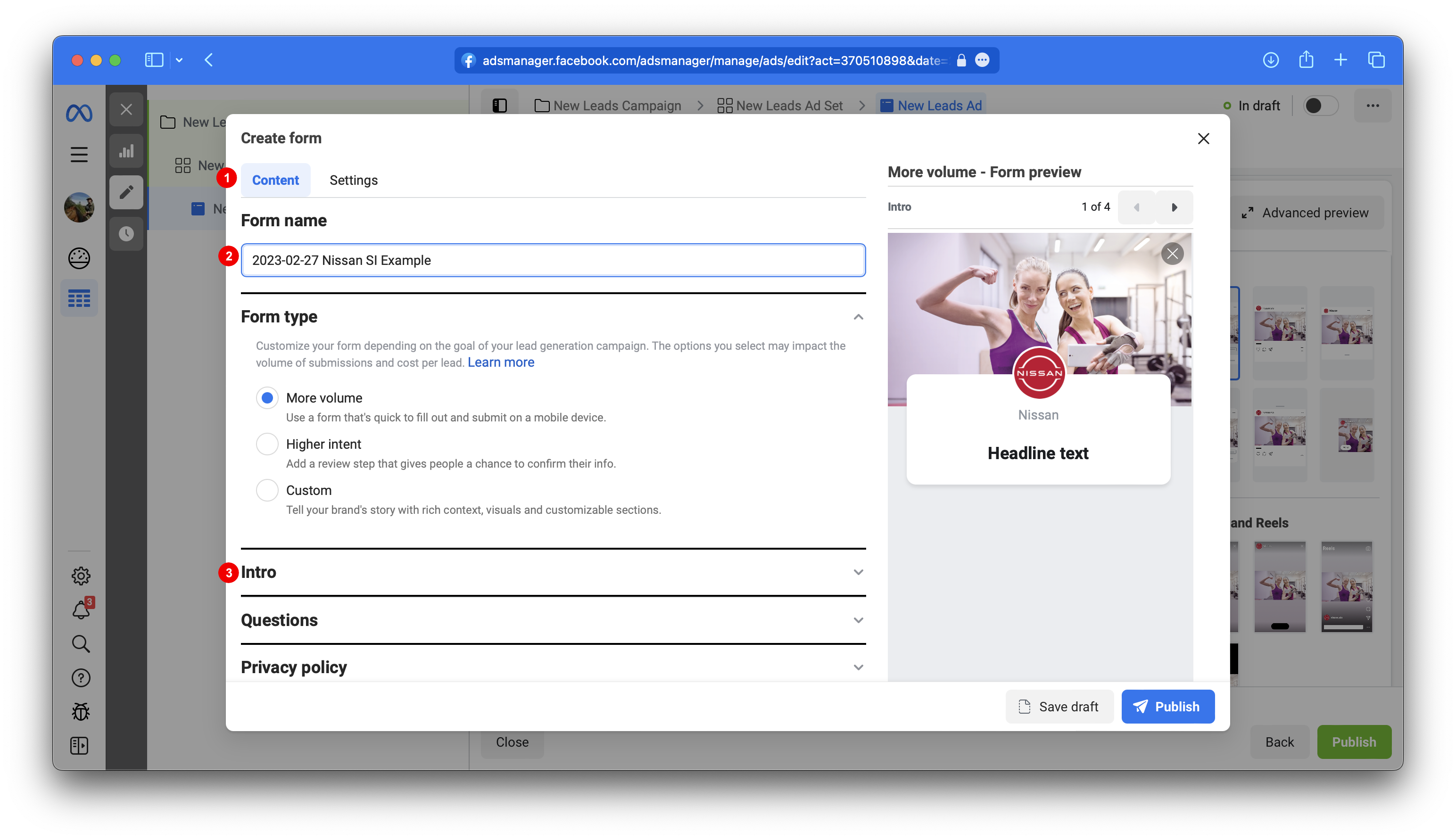
Make sure that you are under Tab Content 1 where you
will fill Content of the form. Content texts are arbitrary, meaning that they may be fully customized or
omitted, though most questions are required.
2.2.
Under Form name 2 fill
out arbitrary title for your convenience.
2.3.
Expand section Intro 3.
2.4.
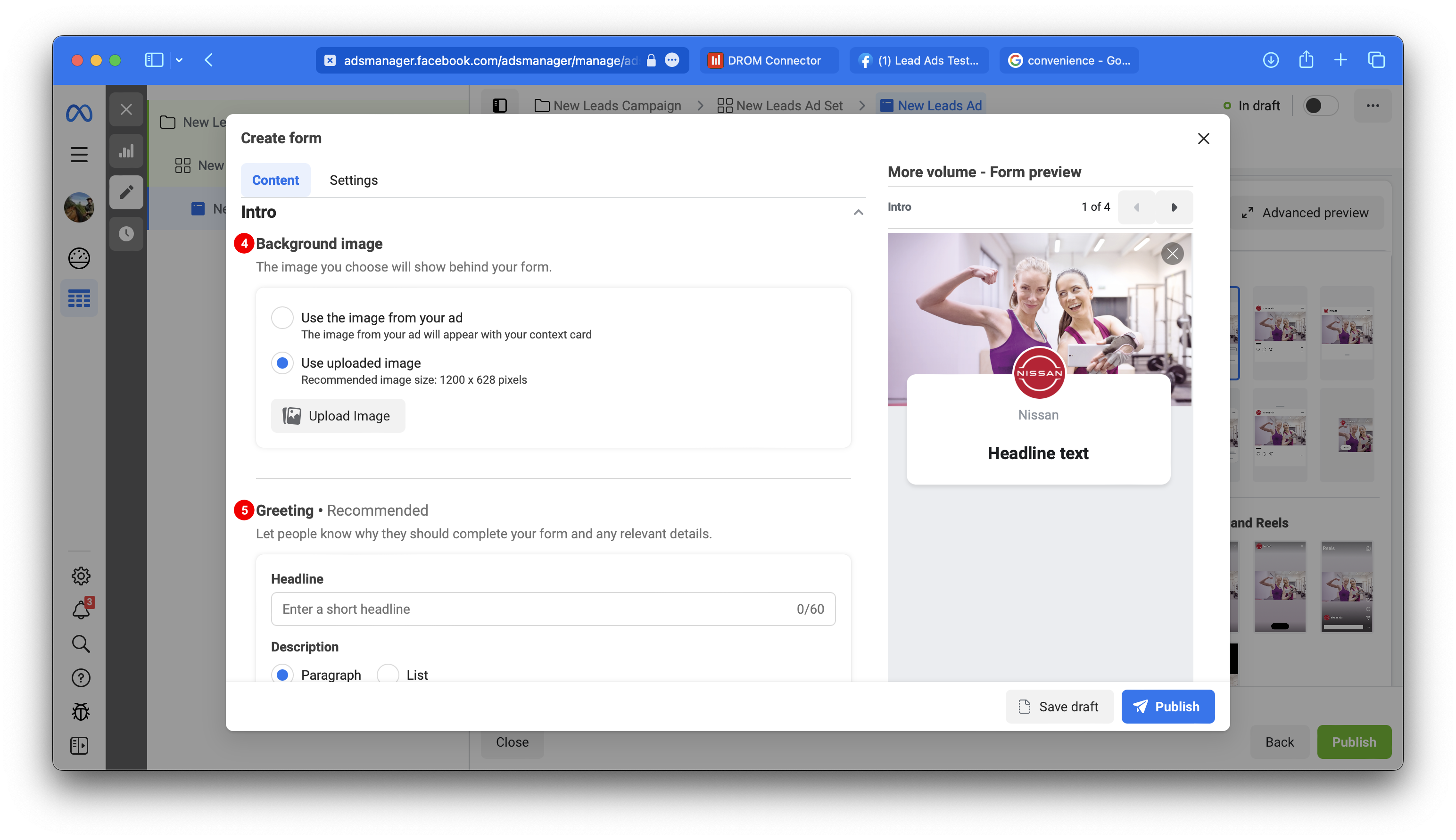
Set Background image with recommended size 1200 x 628 pixels
4 and fill out Greeting 5.
Example Headline
Rezerviraj testno vožnjo
Example Paragraph description
Zapelji novi #Renault #Austral #etech #fullhybrid
2.5.
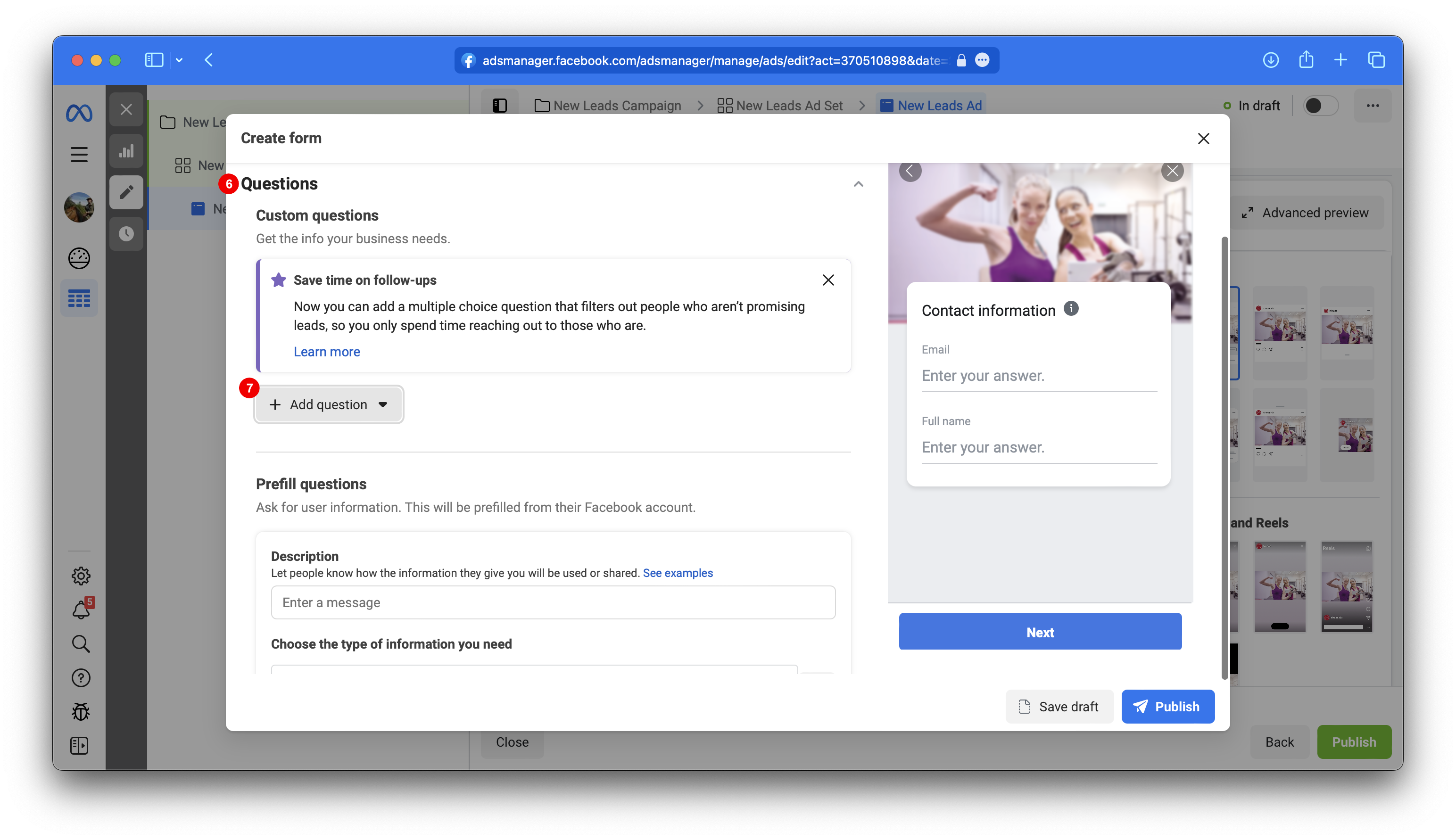
Expand section Questions 6 and under Custom Questions add Multiple Choice qustions 7 for Location (dealers) and Title (G. / Ga. / Gđa / Ne želim se izjasniti / ...). Question text is arbitrary though it is recommended to stick to english language as LeadAds Forms do not support yet SI/HR language and would create inconsistancy between Custom Questions and Prefill questions, though answers will be better if presented in local language.
2.6.
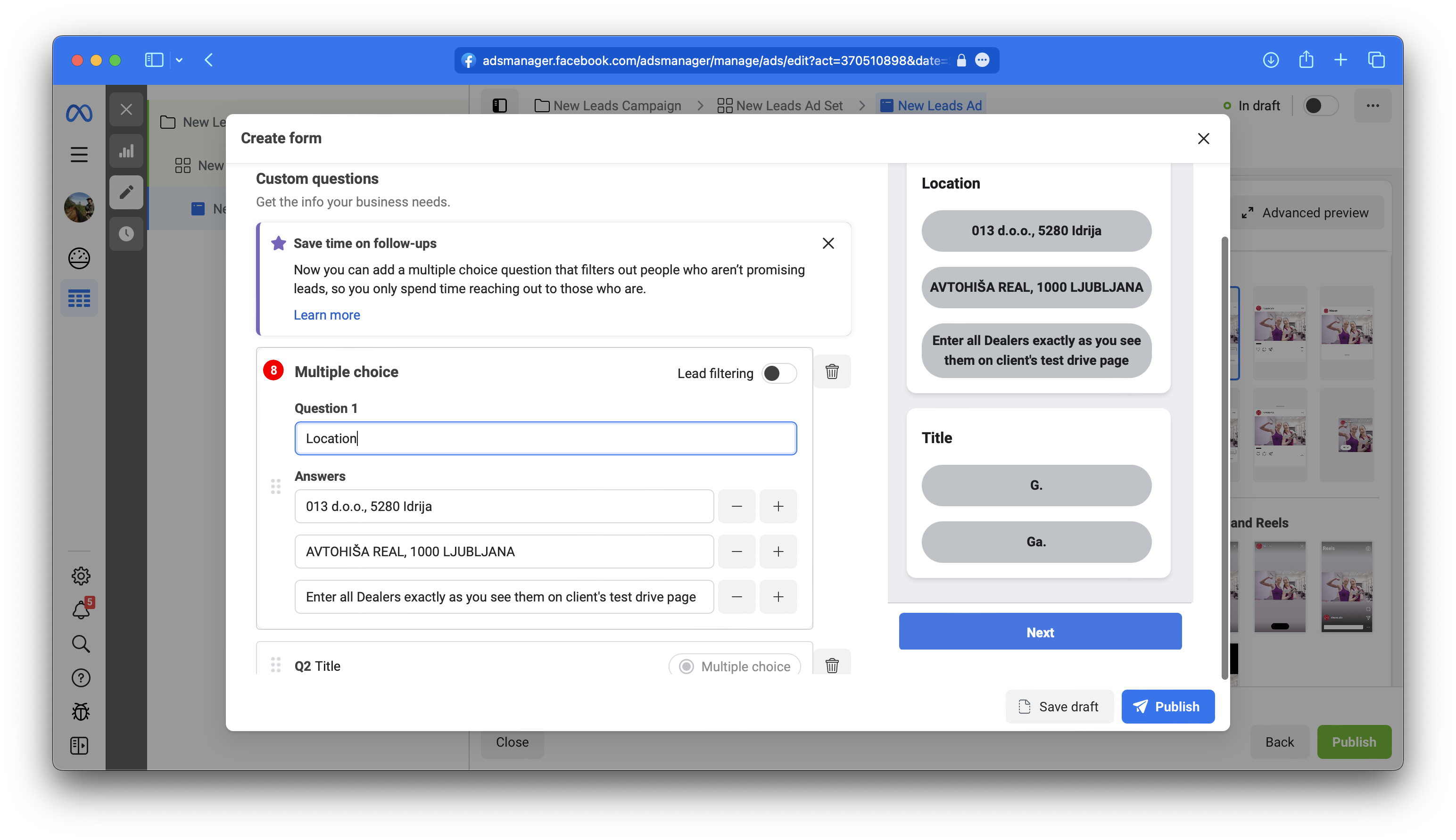
First Multiple choice Question 8 for Location. Copy dealers from client's website testdrive/offer form. Please note that dealers might be different per vehicle model. You may freely change how Dealers in Answers are formatted. This question is optional. You are free to name Location as you please.
Example Question 1
Location
Example Answers
013 d.o.o., 5280 Idrija
AVTOHIŠA REAL, 1000 LJUBLJANA
etc.
2.7.
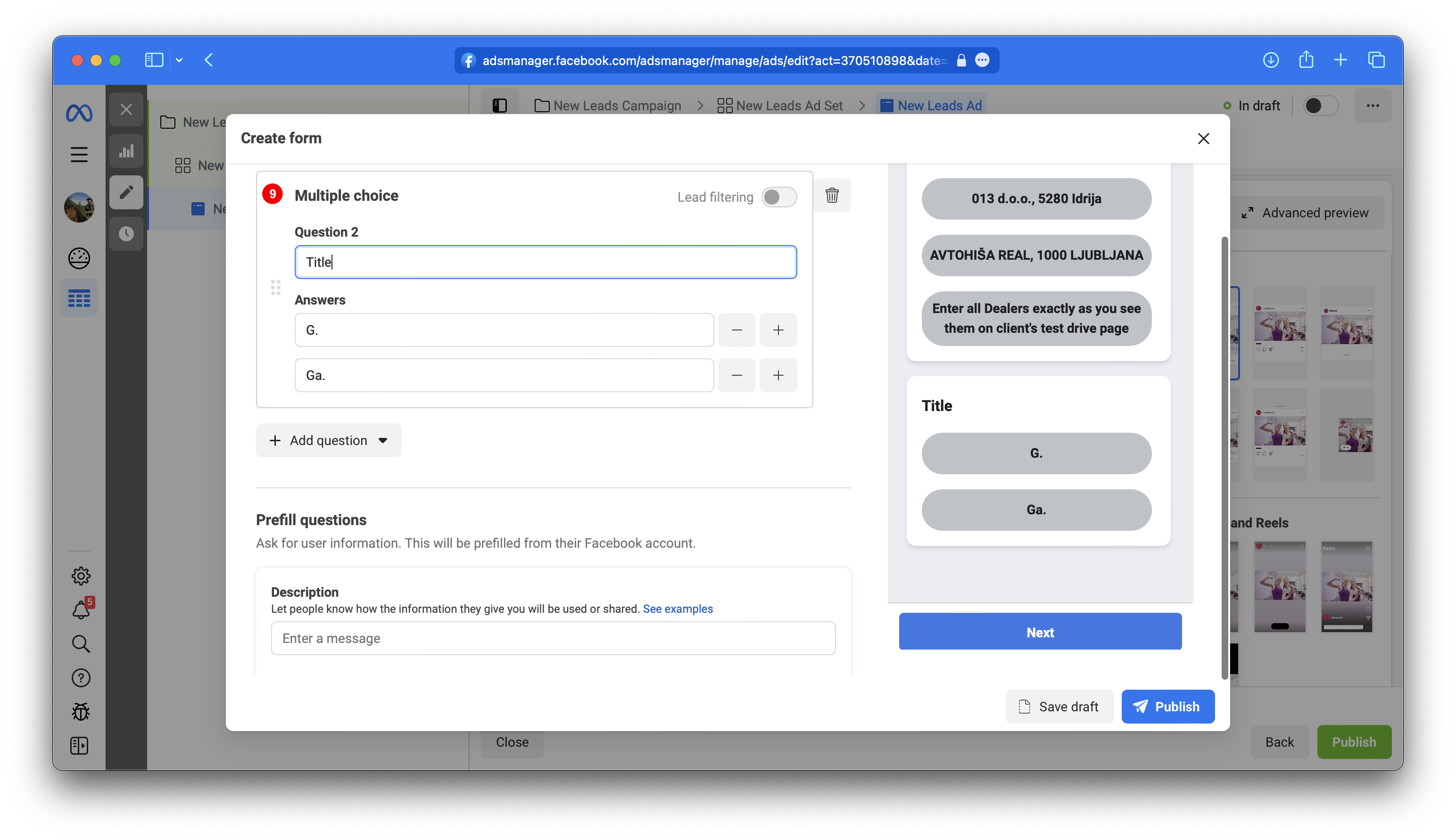
Second Multiple choice Question 9 for Title. Copy answers from client's website testdrive/offer form. This question is optional.
Example Question 2
Title
Example Answers
Ga.
G.
Gđa.
Ne želim se izjasniti
2.8.
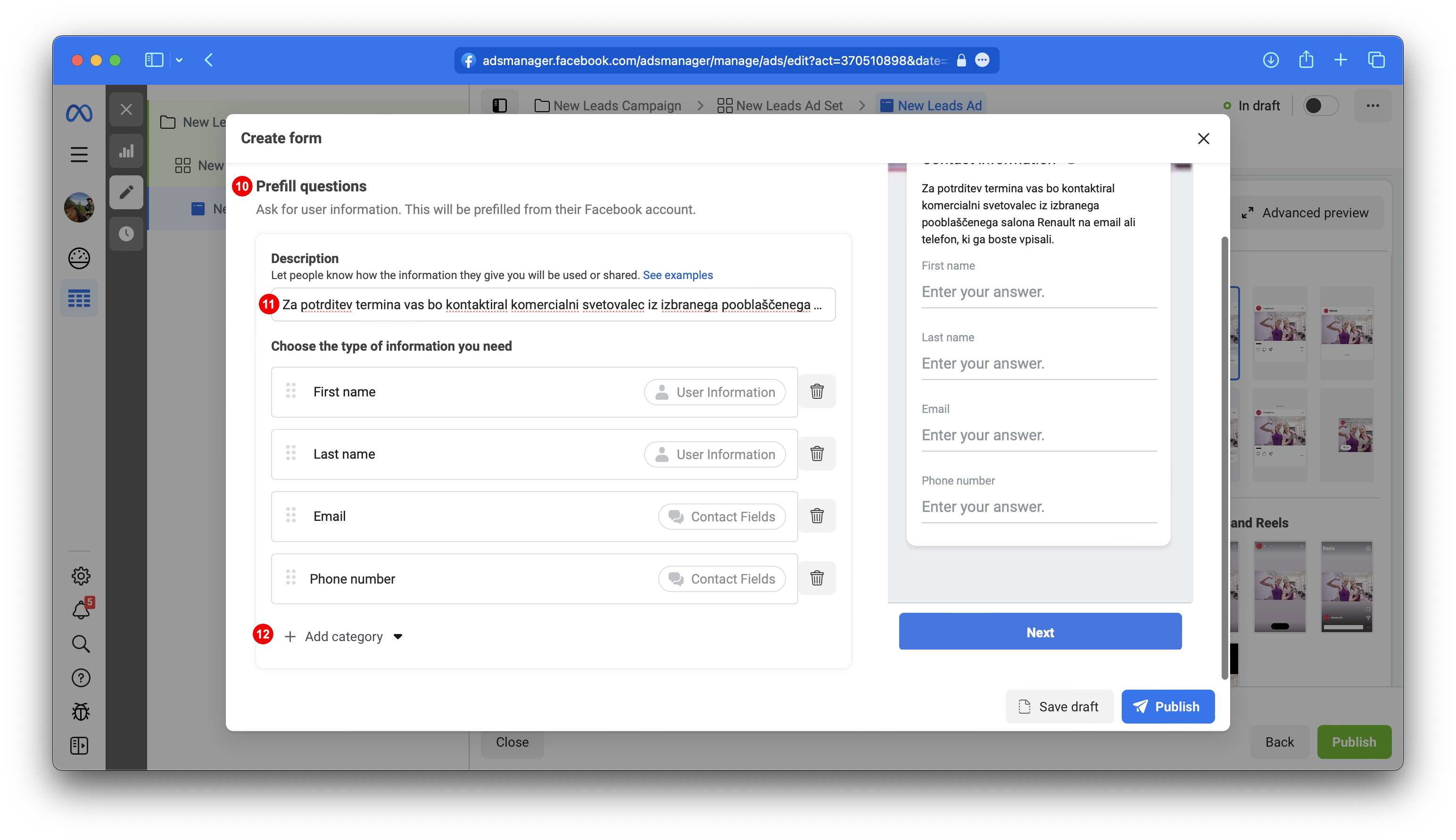
Under Prefill questions 10. Optionaly enter description 11. Remove Email and Full Name and under Add Category 12 add First Name, Last Name, Email and Phone. Optionaly you may also include Street address, Post Code and City. Do not add anything else.
Example Description
Za potrditev termina vas bo kontaktiral komercialni svetovalec iz izbranega pooblaščenega salona Renault na email ali telefon, ki ga boste vpisali.
2.9.
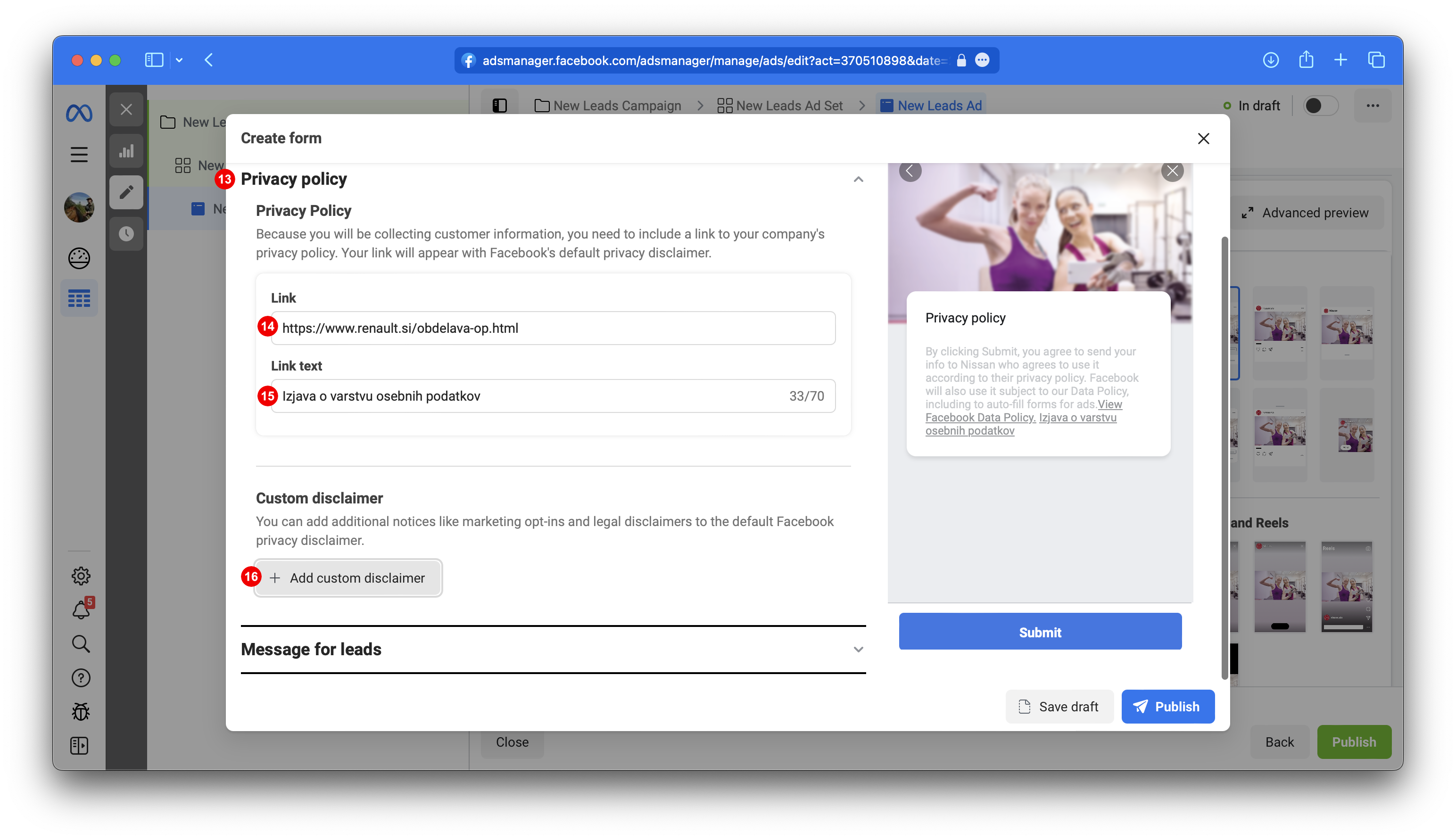
Expand Privacy policy 13 fill out privacy policy link 14 and it's label under link text 15. Add Custom disclaimer 16.
Example Link
https://www.renault.si/obdelava-op.html
Example Link Text
Izjava o varstvu osebnih podatkov
2.10.
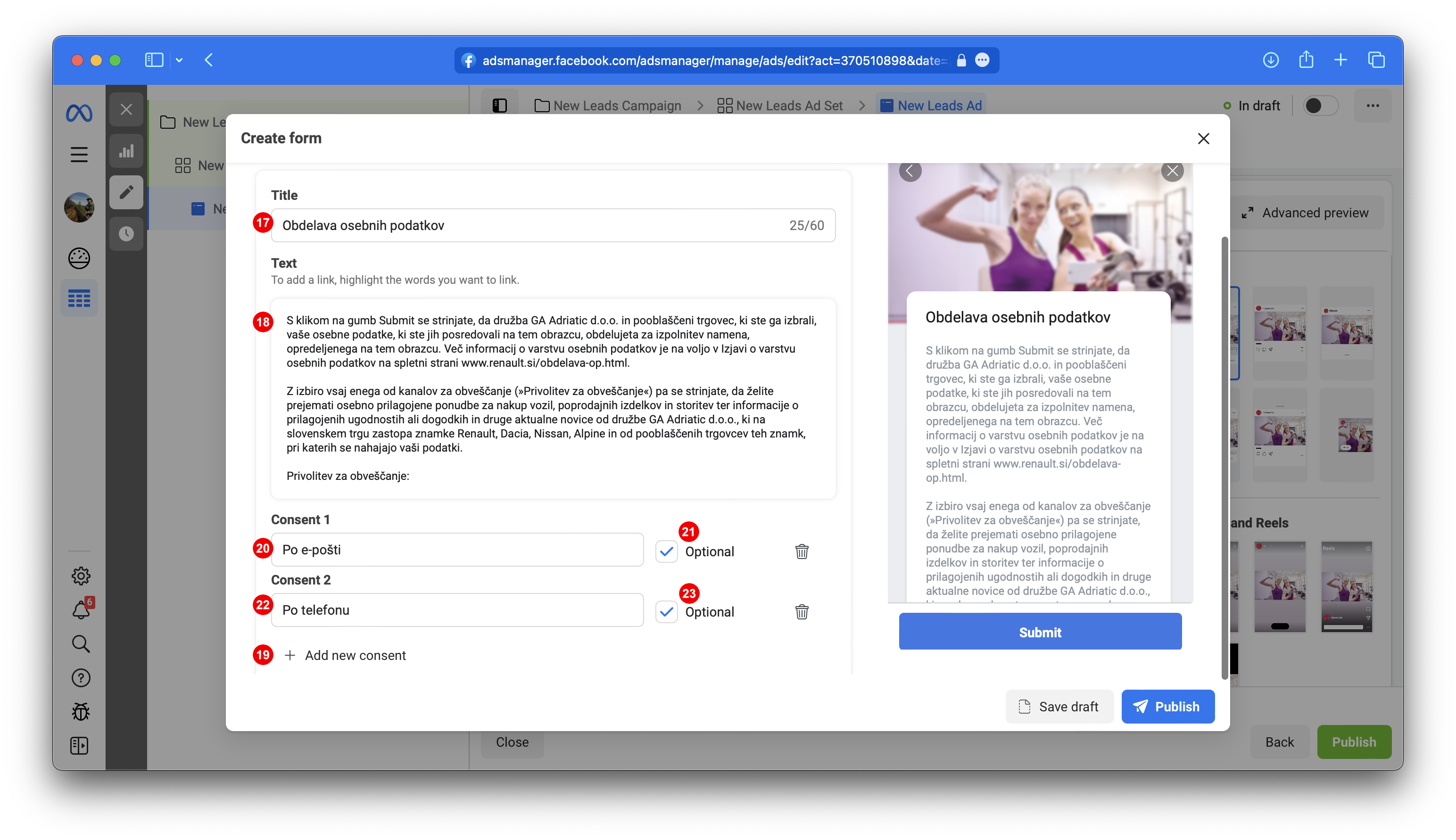
Under Custom consent enter title 17 and description under Text 18. Add 2x new consent 19. Under Consent 1 20 enter "Po e-pošti" and make it optional by placing a checkmark at optional 21. Under Consent 2 22 enter "Po telefonu" and make it optional by placing a checkmark at optional 21. Consent 1 and Consent 2 may be omitted and/or translated.
Example Title
Obdelava osebnih podatkov
Example Text
S klikom na gumb Submit se strinjate, da družba GA Adriatic d.o.o. in pooblaščeni trgovec, ki ste ga izbrali, vaše osebne podatke, ki ste jih posredovali na tem obrazcu, obdelujeta za izpolnitev namena, opredeljenega na tem obrazcu. Več informacij o varstvu osebnih podatkov je na voljo v Izjavi o varstvu osebnih podatkov na spletni strani www.renault.si/obdelava-op.html.
Z izbiro vsaj enega od kanalov za obveščanje (»Privolitev za obveščanje«) pa se strinjate, da želite prejemati osebno prilagojene ponudbe za nakup vozil, poprodajnih izdelkov in storitev ter informacije o prilagojenih ugodnostih ali dogodkih in druge aktualne novice od družbe GA Adriatic d.o.o., ki na slovenskem trgu zastopa znamke Renault, Dacia, Nissan, Alpine in od pooblaščenih trgovcev teh znamk, pri katerih se nahajajo vaši podatki.
Privolitev za obveščanje:
Z izbiro vsaj enega od kanalov za obveščanje (»Privolitev za obveščanje«) pa se strinjate, da želite prejemati osebno prilagojene ponudbe za nakup vozil, poprodajnih izdelkov in storitev ter informacije o prilagojenih ugodnostih ali dogodkih in druge aktualne novice od družbe GA Adriatic d.o.o., ki na slovenskem trgu zastopa znamke Renault, Dacia, Nissan, Alpine in od pooblaščenih trgovcev teh znamk, pri katerih se nahajajo vaši podatki.
Privolitev za obveščanje:
2.11.
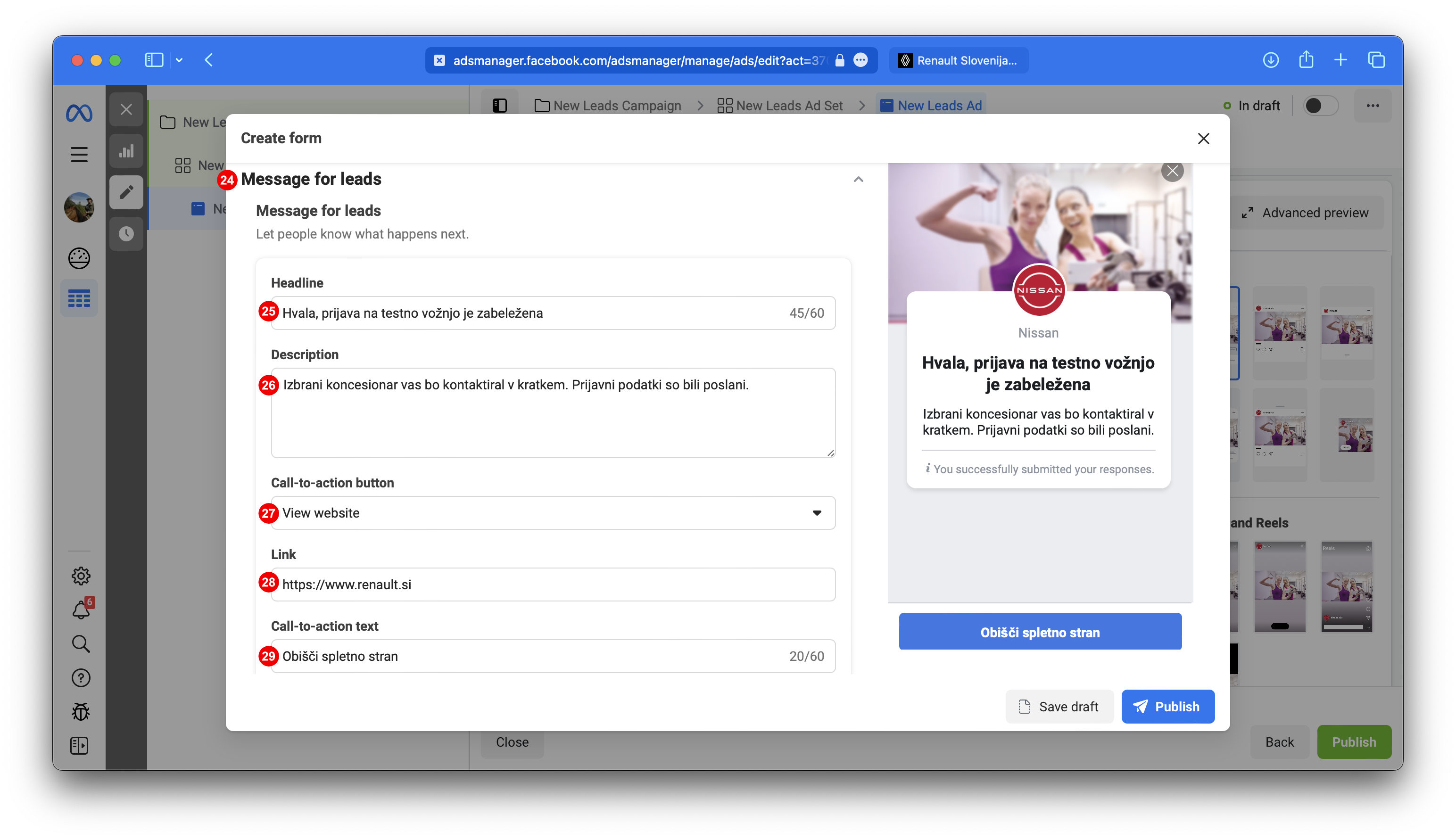
Expand section Message for Leads 24. Put thank you title under 25 and under Description 26 additional information. Choose Call to action 27, call to action link 28 and Call to action button text 29.
Example Title
Hvala, prijava na testno vožnjo je zabeležena
Example Description
Izbrani koncesionar vas bo kontaktiral v kratkem. Prijavni podatki so bili poslani.
Example Link
https://www.renault.si
Example Call-to-action text
Obišči spletno stran
3. Fill Settings
3.1.
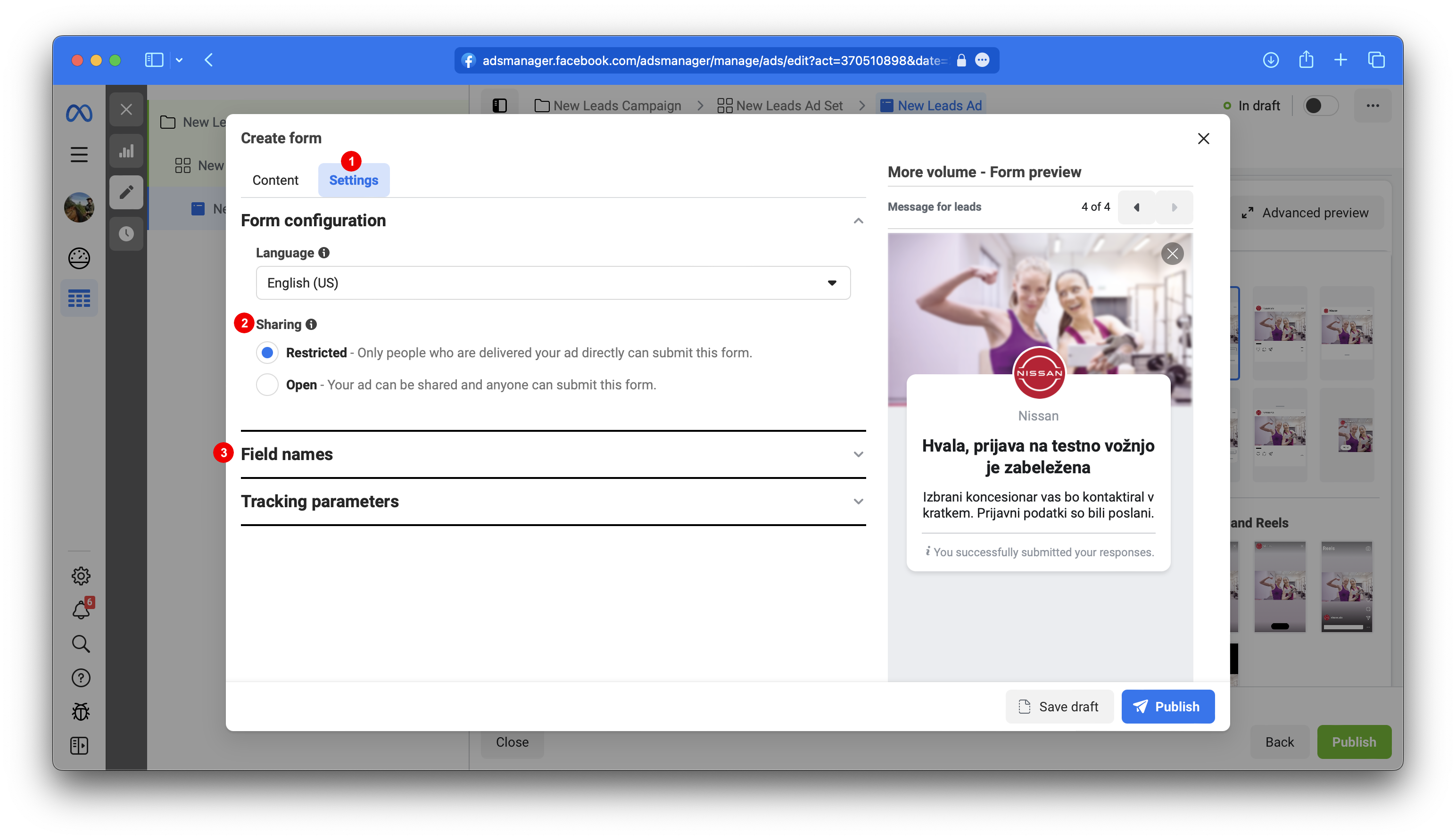
Scroll to top of your Form and choose Settings Tab 1. Settings tab is used to define field IDs and additonal required fields: model, eventName and eventType. IDs must be entered exactly as you see them in this How To. Do not leave empty spaces. Make sure you respect Uppercase
and lowercase notations as seen in this How To. Form configuration Language and Sharing are the only two parameters under Settings that you may choose their value without breaking anything. Expand section Field names 3. Field Names section and Tracking parameters section consists of Field IDs and Answer IDs/Values.
3.2.
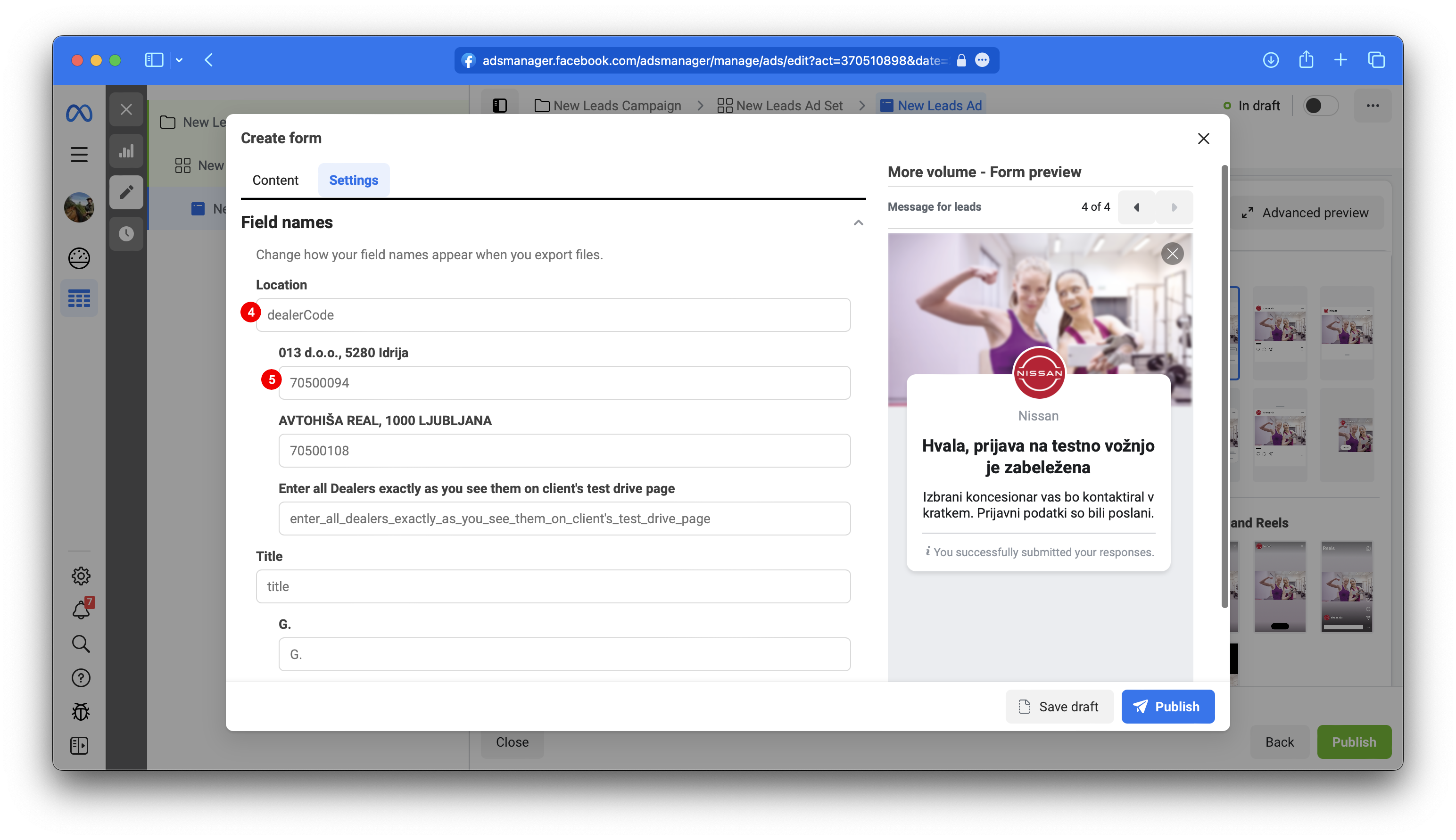
Set Location field ID 4 to dealerCode. Enter unique numerical BIR CODE for each Dealer 5. Make sure you are using updated list for the correcposning vehicle model. BIR codes are usually provided to you in Excel file. Make sure you put the right BIR code in from of the corresponding Dealer. This field is optional.
Location ID
dealerCode
Each Dealer BIR
Enter unique numerical BIR CODE for each Dealer.
3.3.
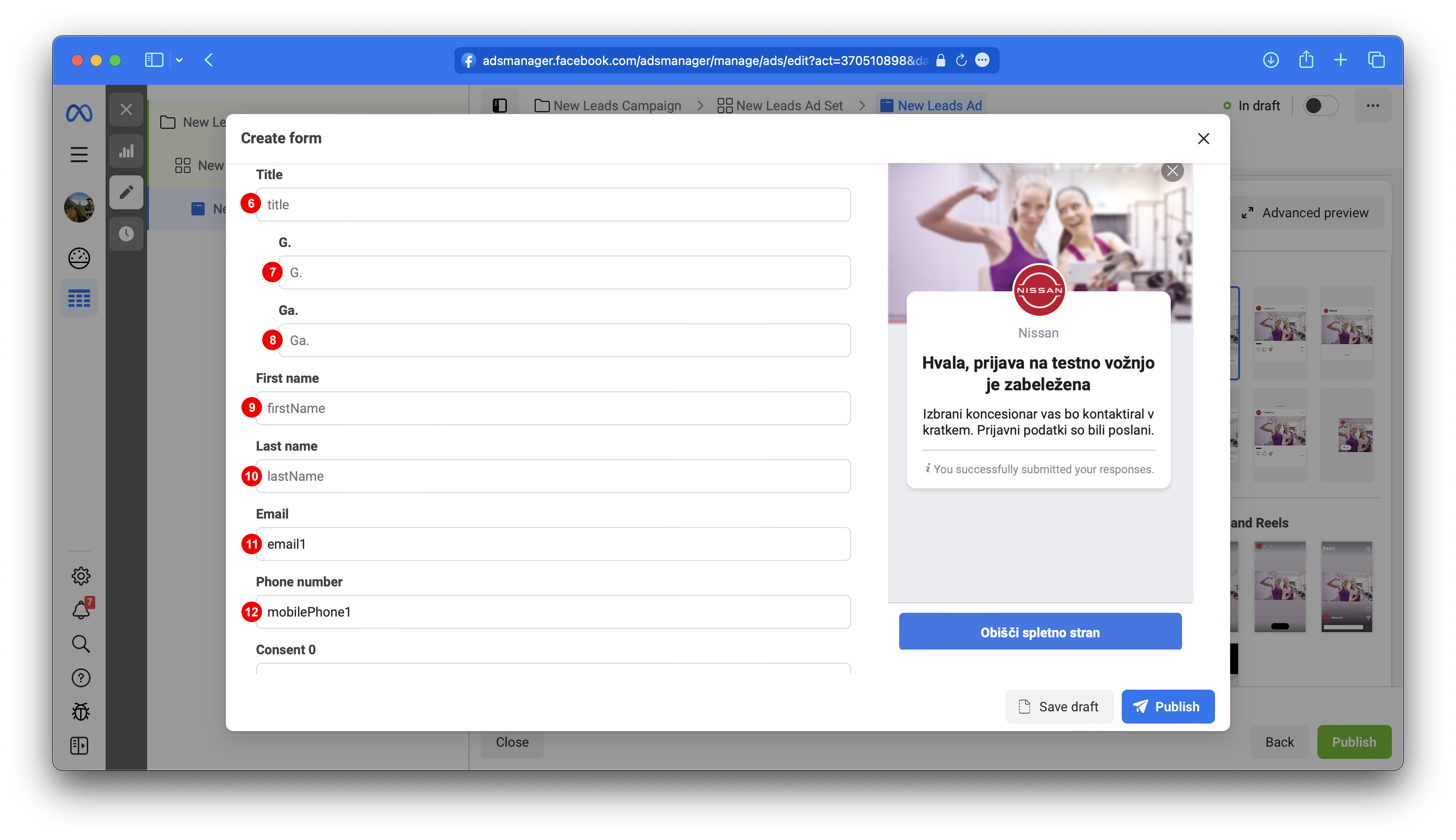
Set all qustion field IDs 6, 9, 10, 11, 12 and answers IDs 7 and 8 based on target audience language.
If you have added optional questions such as Title, Street addres, City and/or Post Code, enter their corresponding field IDs as well. Any other field will be ignored.
Title ID
title
First name ID
firstName
Last name ID
lastName
Email ID
email1
Phone number
mobilePhone1
Street address
streetWithHouseNumber
Post code
zipCode
City
zipName
3.4.
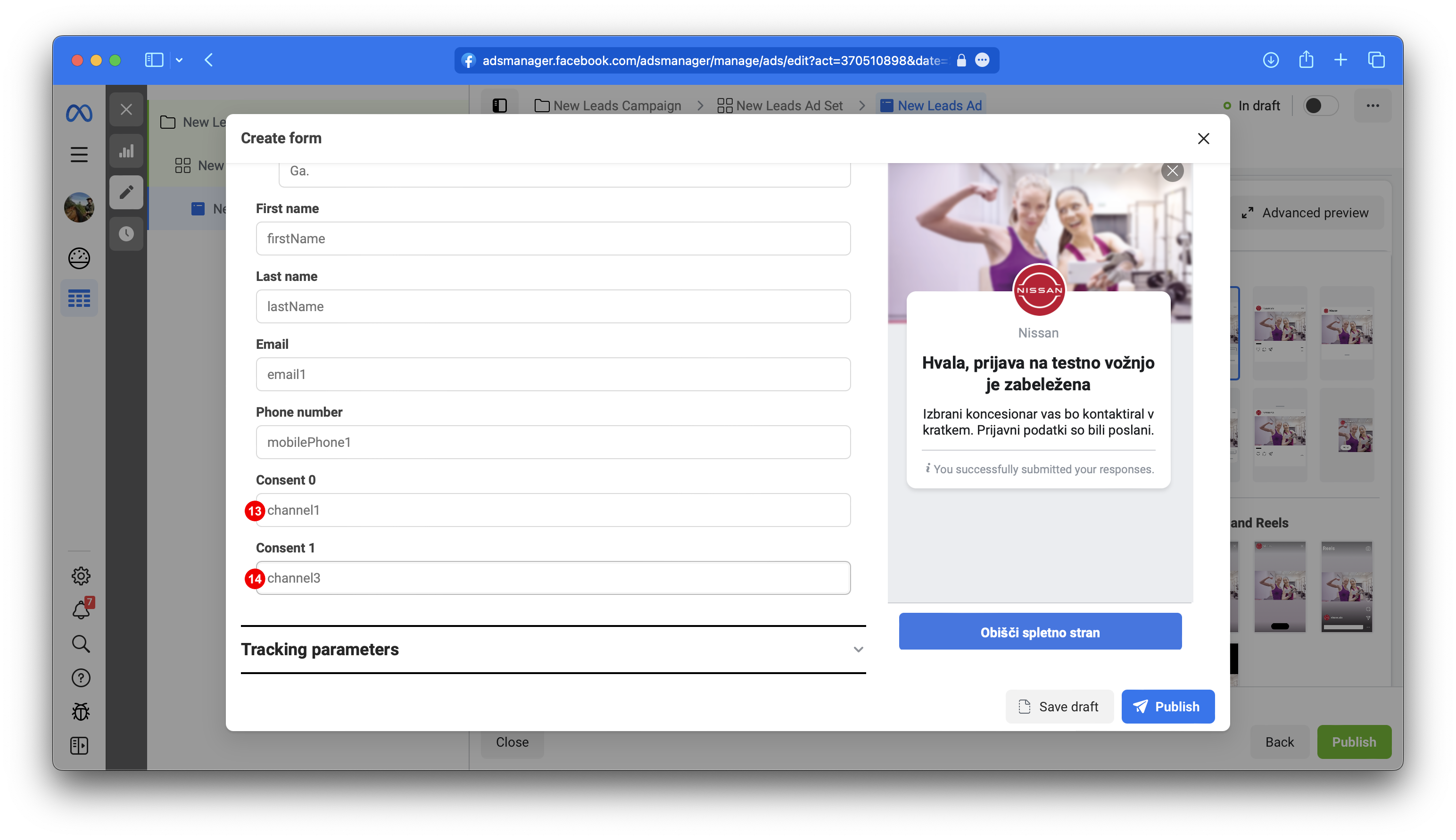
Set consent field IDs 13 and 14. If you have entered any additional consent channels on Content Tab, use legend below to select correct ones.
Consent 0 ID
channel1
Consent 1 ID
channel3
Consent Channel Legend:
Email consent channel
channel1
Mail channel
channel2
Phone number channel
channel3
SMS/MMS channel
channel4
3.5.
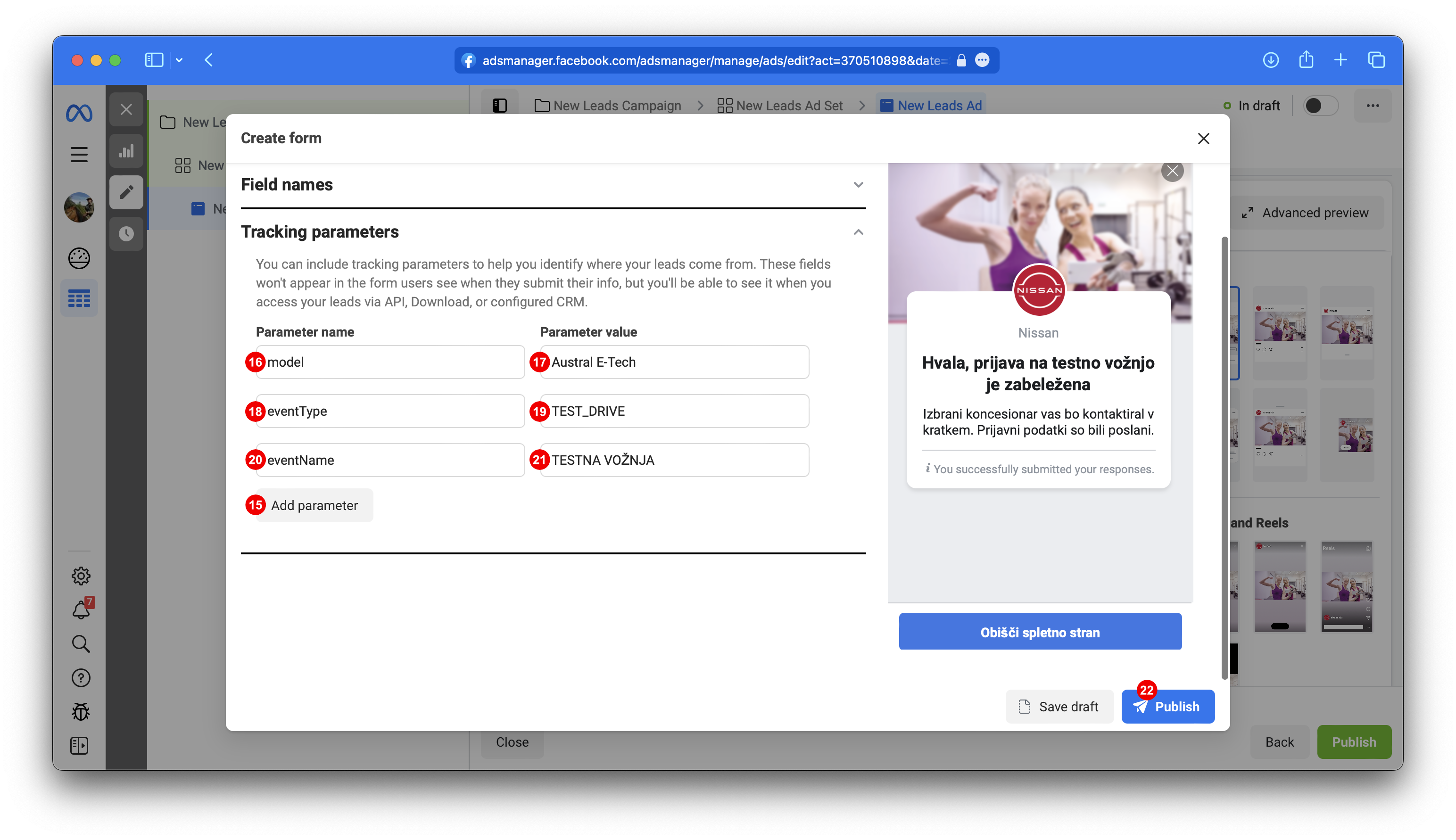
3x Add parameter 15. Fill pairs name, param value pairs. Param name 16: model, param value 17: Vega acceptable model name. Param name 18: eventType, param value 19: Vega acceptable eventType, most likley TEST_DRIVE or NEW_VEHICLE_OFFER. Param name 20: eventName, param value 21: Vega acceptable event name. Finish editing by pressing Publish 22
model value example
Austral E-Tech
eventType acceptable values
TEST_DRIVE
NEW_VEHICLE_OFFER
OTHER
BROCHURE
CATALOG_OFFER
USED_VEHICLE_OFFER
FINANCING_OFFER
INFO
AFTER_SALES
PRICE_LIST
SERVICE
AFTER_SALES_TYRES
AFTER_SALES_MAINTENANCE
AFTER_SALES_COST_ESTIMATION
AFTER_SALES_BODY_REPAIR
BUSINESS_LEASE
AFTER_SALES_ECONOMY_5_PLUS
eventName suggested values, you may add your own
Testna vožnja
Probna vožnja
Želim ponudbo
Želim ponudo
4. Test Lead Form
Follow our Testing steps.